
☁️ Digital Declutter: Better Systems for Family Photos
Simple tools to organize, save, and actually find your family's memories.

Edition #227 | Read time: 5 Minutes
Hi Mamas,
Before we dive in, two quick things:
☀️ If you had trouble accessing our Savor Your Summer Guide from last week’s newsletter, we’re currently in the middle of some website updates. We’ve included an updated link here so you can grab it easily.
📚 And because summer reading season is officially here, we’re giving away one book every week this month! Just comment on this post for a chance to win a copy of Kristy Woodson Harvey’s newest release, Summer State of Mind.
This week we’re answering the question…
What exactly are we doing with all these photos?
There are plenty of reasons we’re thankful to be parenting in 2026. Grocery delivery is high on the list, amen? But the thousands of photos and digital memories we’re collecting…that’s become a whole situation.
Most of us aren’t struggling to capture memories. We’re struggling to manage them.
As the school year wraps up and summer begins, we thought this was the perfect time to talk about simple ways to organize, preserve, and actually enjoy the memories we’re already capturing.
Also, since it’s the first newsletter of the month, don’t miss our June Must Reads at the bottom.
Enjoy!
—The Carry™ Team
This week in The CARRY™ ALL, we’re talking about:
📸 The System
☁️ The Storage
🧹 The Cleanup
As always, this is a space for our Carry™ community to connect with each other. Leave a comment and keep the conversation going. And, we bet there’s another mama that would love The Carry™ All in their inbox, too. Pass on the love!
THE BIG 1️⃣ 2️⃣ 3️⃣
1️⃣ 📸 The System
Tier 1: Keep It Simple
If you’re overwhelmed and don’t know where to start, this is for you.
Set a recurring reminder on your calendar at the beginning or end of every month. Seriously. Go do it now. We’ll wait.
Once a month, spend 15–30 minutes looking through that month’s photos and videos. Delete the blurry ones. Remove duplicates. Save the ones you want to keep.
Then pick ONE place to store them.
Google Photos. iCloud. Dropbox. Amazon Photos. Whatever works for your family. We have more info below on what to choose but the key is choosing something and sticking with it.
If you’re years behind, don’t panic! Add a second reminder mid-month and use it to tackle one previous month at a time. Little by little, you’ll catch up.
Tier 2: Let AI Help
If you’re ready for a little more structure but don’t want to spend hours organizing, let technology do some of the heavy lifting.
We recently came across this Instagram creator who shares fantastic tips for using AI to sort, organize, search, and manage family photos. Some of her ideas are genius and could save you hours of scrolling. Exhibit A HERE.
Tier 3: Make It Your 2026 Project
If you’ve reached the point where your camera roll feels like a digital storage unit and you’re ready to finally get this ish handled once and for all, this one’s for you.
Nancy Ray’s Legacy Photo System is one of the most comprehensive photo organization resources we’ve found. She walks you through creating a sustainable system for organizing, backing up, preserving, and managing your family photos for the long haul.
It’s an investment, but if “figure out our family photos” has been sitting on your to-do list for years, this might be the summer to tackle it.
2️⃣ ☁️ The Storage
Okay, you’ve got a system…or a plan for a system at least. Now where should all those memories live?
A few popular options:
📚 Yearly Photo Books
🏆 Chatbooks — Our pick for convenience.
💰 Shutterfly — Our pick for budget-friendliness.
✨ Artifact Uprising — Our pick for quality.
🎨 Mixbook — Our pick for customization.
CARRY™ Take: If you’re overwhelmed and haven’t printed photos in years but you want to, start with Chatbooks.
☁️ Cloud Storage
Google Photos – 15GB free with a Google account; paid plans start when you need more storage.
iCloud Photos – 5GB free; paid plans available for additional storage.
Amazon Photos – Unlimited full-resolution photo storage included with Amazon Prime (video storage limits apply).
Dropbox – 2GB free; paid plans available for larger storage needs.
Pro tip: If you’re already paying for Google, Apple, Amazon Prime, or Dropbox for other reasons, start there.
3️⃣ 🧹 The Cleanup
A few apps that can help:
SwipeWipe – Turns photo cleanup into a simple swipe-left, swipe-right experience.
Cleanup: Phone Storage Cleaner – Helps identify duplicates, blurry photos, and screenshots.
Google Photos – Built-in suggestions for deleting blurry images, screenshots, and large files.
✨ Quick Win: Search your camera roll for “screenshots” and spend five minutes deleting. You’ll probably free up more space than you think!
Help another mama out 👇 What's the best photo organization tip, app, or system you've found? Bonus points if it's simple and realistic. 🤍
📚 Monthly Book Picks

📚 Click here to grab a copy of these reads. Read anything lately that you can’t stop talking about? We’d love to hear it! Drop it in the comments at the bottom of the newsletter. Your rec might be exactly what another mom needs!
📅 DATES TO KNOW
Maycember had our brains feeling a littleeee fried. 🤪 Thanks for the grace (and the fact-checking). Here's the corrected lineup:
👨 Sunday, June 21 — Father’s Day + First Day of Summer
🎙️ On The Podcast
Beginning this week on The Paula Faris Show, Paula is hosting a June series with Kristen White from the CARRY™ team called “MomFessions.”
We’re sharing how we really feel about some of parenting’s hottest topics this time of year:
☀️ Maycember
🏖️ Why summer isn’t exactly a break for working parents
⚽ Why youth sports have gotten out of control
👦👧 Raising boys vs. raising girls
...and more.
If you’ve ever thought, “Surely I can’t be the only mom who feels this way,” this series is for you. 🎧 You can listen to this week’s episode all about surviving Maycember HERE.

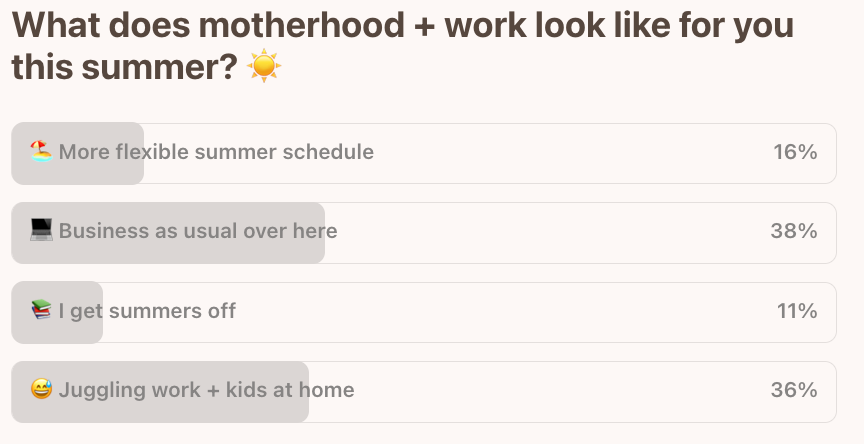
🗳️ LAST WEEK’S POLL RESULTS
Last week, we asked:

I always love all your tips! And I feel seen everytime I read your newsletter. Thank you! :)
How's the graduate doing 🥹😊😊😊